LED
From Fixme.ch
Revision as of 20:56, 7 November 2015 by Sasha (Talk | contribs) (Created page for LEDs in general, started work on guide for PCA9685)
Page about everything that is LED
Controlling LEDs with RPi
PCA9685 I2C board
Steps to get it to work
- Connect VCC to Pi's 3.3v, GND to Ground
- Connect the SCL to pin 05 (GPIO3) SDA to pin 03 (GPIO2)
- sudo apt-get install python-smbus i2c-tools
- Add the following two lines to
/etc/modules/with something like sudo nano:
i2c-dev
i2c-bcm2708 - Add the following lines to
/boot/config.txtand reboot: (see this for older Pi's)device_tree=bcm2708-rpi-b-plus.dtbdevice_tree_param=i2c1=ondevice_tree_param=spi=on - Run
sudo i2cdetect -y 1and you should see something like this: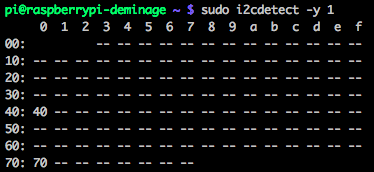
If everything was setup correctly, you now should be ready to go


